
From Domain Name to IP Address is a fundamental subject to anyone learning networking, web design, or cyber security. When you type in a website URL such as example.com in your browser, your computer must first find the IP address that corresponds to that domain name before it can connect to the web server. The Domain Name System (DNS) does this: it translates between human-readable domain names and machine-readable IP addresses. Without DNS, people would have to know numeric IP addresses instead of easy to remember names for websites. DNS also plays a vital part in website availability, network administration, email delivery and cybersecurity.
What Is DNS?
DNS means Domain Name System It is a distributed naming system that enables computers to discover services and devices on networks by mapping domain names to IP addresses .
For example: a user could write:
www.abc.com
Instead of memorising an address such as:
203.0.113.10
The network utilises the respective IP address . DNS permits apps to use the domain name . Google Cloud says that DNS is a hierarchical, distributed database that holds IP addresses and other information, and allows this information to be sought up by name.
DNS is not a single server. Standard DNS servers and systems that work together.
Why Is DNS Needed?
Computers talk to each other using IP addresses. IPv4 utilises numerical values, but IPv6 uses longer hexadecimal addresses.
It’s not always easy to remember the IP address of each website. DNS provides a convenient naming layer that allows people to use names such as google.com, microsoft.com or explainmetech.com. DNS is hence analogous to an internet directory. DNS translates the name of a website into its location when you ask for it.
According to Microsoft, DNS is the mapping of computer names to IP addresses. It is a standard name-resolution service for Windows networks.
How DNS Works Step By Step?
The DNS resolution process can use multiple systems. Here’s a simple explanation of what happens when you type a domain name into your browser.
1. You Enter a Domain Name
Let’s say you wrote:
Type www.example.com in your browser.
To be able to connect to the destination server, the browser has to know the IP address of the server that is connected with this hostname.
2. The Browser Checks Cached Information
Your browser may already have cached DNS information from a previous visit.
If the information is still valid and present, then the browser can use the cached result, rather than doing a full DNS lookup.
Caching minimises DNS traffic and can speed up website loading.
3. The Operating System Checks Its DNS Information
If the browser doesn’t know the answer, the operating system might look in its own DNS cache.
Computers cache DNS entries that have recently been resolved for a period of time based on the record’s Time to Live, or TTL.
If the address is still in the local cache, the computer can access it.
4. The DNS Resolver Receives the Request
If the information is not available locally, the request is passed to a recursive DNS resolver.
The resolver may be run by an organization, internet service provider, network administrator or public DNS provider.
The recursive resolver returns the final answer to the client. A recursive resolver can ask other DNS servers, until it has the information it needs, Google Cloud says.
5. The Resolver Checks Its Cache
The recursive resolver checks if it already knows the IP address.
If the answer is cached, it can promptly return the result.
If the record is not cached, the resolver proceeds with the lookup.
6. The Resolver Contacts a Root DNS Server
The recursive resolver starts to work its way across the DNS hierarchy if necessary.
The first significant level is the root of the DNS.
Root servers generally don’t return the ultimate IP address for a website. … yet they are used to point the resolver to the correct Top Level Domain (TLD) servers.
For instance , a .com domain is matched with a .com TLD .
7. The TLD Server Is Queried
The resolver then asks the proper TLD infrastructure who are the authoritative DNS servers for the specified domain.
For example.com, the .com TLD can tell you what authoritative name servers are responsible for that domain.
8. The Authoritative DNS Server Provides the Answer
The resolver then asks the authoritative DNS server for the domain.
This server is the primary DNS server for the domain.
An authoritative server may have records like A, AAAA, CNAME, MX, NS and other DNS records.
For example, an A record maps a hostname to an IPv4 address.
The recursive resolver then obtains the DNS information from the authoritative server.
9. The Resolver Returns the IP Address
The recursive resolver returns the result to the user’s PC.
Now the computer can learn which IP address corresponds to the hostname being asked for.
The DNS process is complete.
10. The Browser Connects to the Server
Now that the browser has the IP address, it can connect to the destination server.
If the website is HTTPS , the browser may need to do some additional processes with TCP and TLS before the browser can safely exchange HTTP data with the web server .
So DNS does not actually serve up the webpage. In this procedure, its major role is to help the client locate the network destination that corresponds to a hostname.
Understanding DNS Records
Different sorts of records are used for different purposes in DNS.
A Record
A record points a hostname to an IPv4 address.
Example:
example.com. IN A 203.0.113.10
AAAA Record
AAAA record converts a hostname to an IPv6 address.
CNAME Record
A CNAME record generates an alias from one hostname to another.
MX Record
An MX record defines the mail servers that accept email for a domain.
NS Records
An NS record specifies the authoritative name servers for a DNS zone.
PTR Record
Reverse DNS lookups sometimes involve a PTR record that maps an IP address back to a hostname.
What Is DNS Caching?
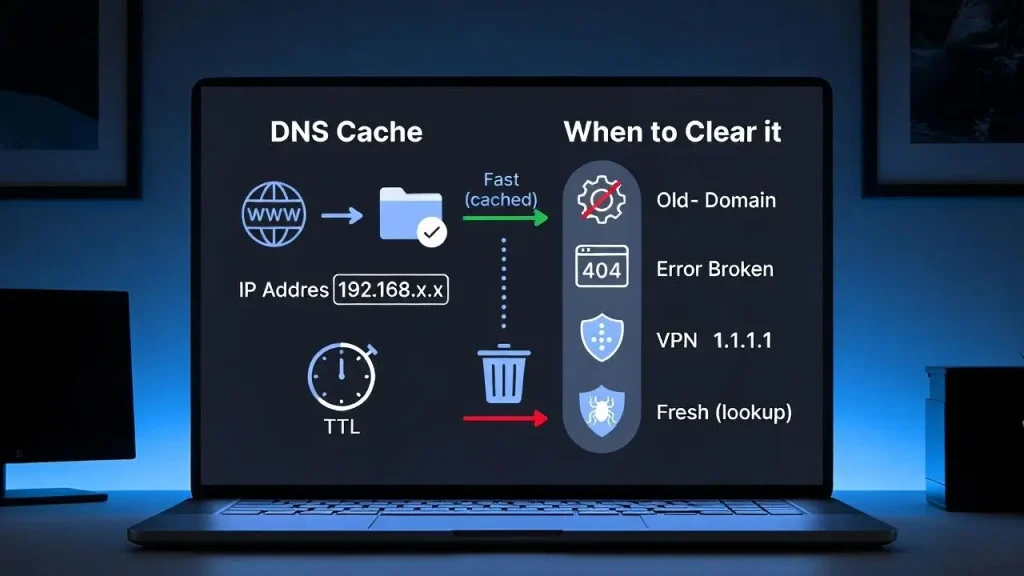
DNS caching is a temporary storage of DNS information for speedier responses to future requests.
The TTL value is the general time that a DNS record can be cached.
For example, if a DNS record has a TTL of 300 seconds, then a resolver can generally cache that record for five minutes.
Caching eliminates the repetitive queries to the authoritative servers and assists in improving the performance of DNS.
Microsoft says that it can answer some DNS queries from cached information, while unanswered enquiries may need to be sent to other DNS servers.
DNS And Cybersecurity
DNS is vital for connection, but it is also a key component of cybersecurity.
Attackers may attempt to exploit DNS-related exploits such as DNS spoofing, cache poisoning, DNS hijacking, and malicious domain abuse.
For example, if DNS data were compromised, then a valid domain could be sent to an IP address controlled by the attacker.
OWASP covers DNS related threats in the form of DNS cache poisoning and DNS pinning. This is especially the case when apps are making network queries based on domain names .
NIST’s 2026 SP 800-81 Revision 3 offers updated guidelines for safeguarding DNS infrastructure. It includes authoritative DNS, recursive DNS, DNSSEC, encrypted DNS, logging, and protection from DNS misuse and misconfiguration.
What Is DNSSEC?
DNSSEC (Domain Name System Security Extensions) gives DNS data authentication and integrity.
Traditional DNS has no built-in cryptographic way to verify that a DNS answer actually comes from the genuine source.
DNSSEC uses electronic signatures to assist validating resolvers in verifying DNS information.
Google says DNSSEC helps authenticate DNS data, and confirm it hasn’t been tampered while in transit.
DNSSEC does not encrypt the regular DNS requests. However, its main purpose is to help with authentication and integrity of DNS data .
DNS Vs IP Address
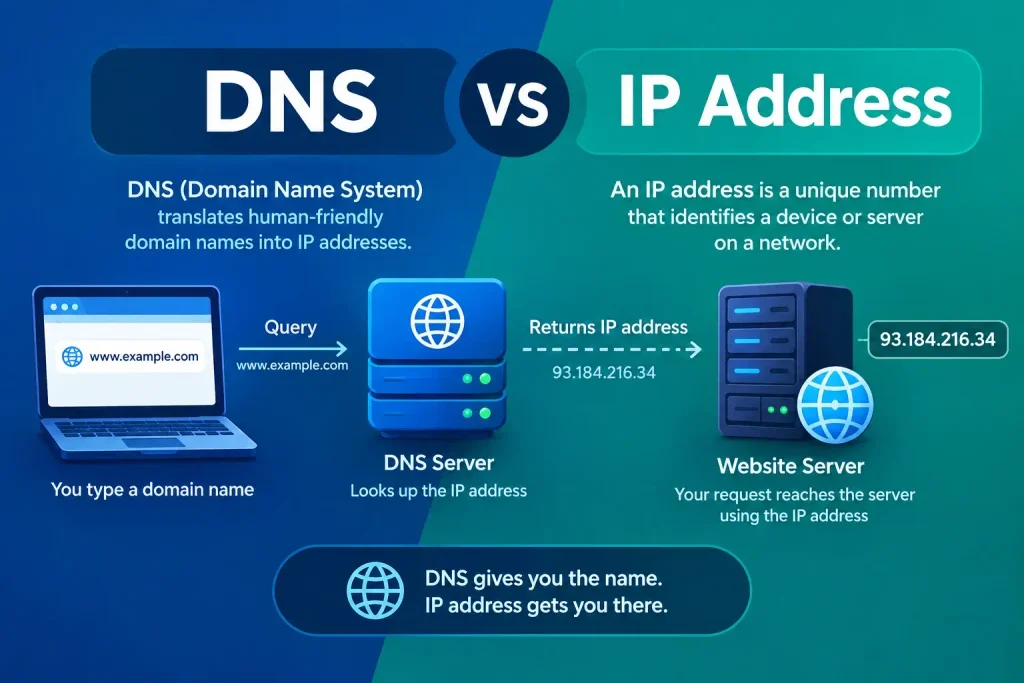
DNS and IP addresses are two different things .
Network destination is identified by an IP address.
A domain name is a human-friendly name that you can look up in DNS.
For example:
Domain: example.com
DNS: Looks up the right record
IP Address: Indicates the network destination
This separation means that a website can change its infrastructure or hosting without the user needing to remember a new numerical address.
Why DNS Matters For Website Owners?
Website owners should have the correct DNS records setup for their websites, email services, verification systems, security measures and other services.
An incorrect A or AAAA record can direct visitors to the wrong server.
Incorrect MX records might impede mail delivery.
If the NS records are incorrect, the domain will not resolve .
Hence, administrators of websites should secure DNS accounts, monitor DNS updates, maintain accurate records and consider appropriate security solutions such as DNSSEC.
NIST notably points out that failures or attacks on DNS might impact the larger network operations. NIST recommends securing the integrity, availability and confidentiality of DNS services.
Conclusion
DNS is one of the building blocks of the Internet. It converts human-friendly domain names into IP addresses so browsers and other apps may find network services. This process may involve local caches, recursive resolvers, root servers, TLD servers and authoritative DNS servers.
Knowing how DNS functions can be beneficial for website owners, network administrators, developers, students of cybersecurity, and regular internet users alike. DNS also plays a significant security role, as malicious attacks or setup errors can misdirect traffic, disrupt services, or expose applications to other hazards. Knowing about DNS records, caching, DNSSEC, and secure DNS management can help consumers understand how modern networks work better.
Frequently Asked Questions
1. What is the full form of DNS?
DNS = Domain Naming System DNS transforms domain names, which are human-readable, into information such as IP addresses that may be used to identify network services.
2. How does DNS translate a domain name to an IP address?
A DNS resolver requests the DNS records of the domain that was requested. It may consult cached information or contact DNS infrastructure (including authoritative name servers) in an effort to retrieve the right IP address.
3. What is a DNS resolver?
A DNS resolver is a system that takes DNS queries and finds replies for clients. A recursive resolver may query other DNS servers if the information requested is not already in its cache.
4. What is DNS Cache?
DNS caching is caching the results of DNS queries for a short period of time. This results in speedier responses to future requests and a reduction of enquiries reaching authoritative DNS servers.
5. Is DNS safe?
Technologies and operational measures such as DNSSEC, protected DNS infrastructure, monitoring and secure configuration can be used to secure DNS. The current NIST recommendation on DNS deployment has security issues for authoritative and recursive DNS systems.
Try Our Tools
Want to learn more about networking and cyber security? Try our tools at ExplainMeTech tools page and get practical tools to aid with technology, cybersecurity and digital-security tasks.
References
NIST – Secure Domain Name System (DNS) Deployment Guide, SP 800-81 Rev. 3
NIST DNS Security Guide
Google Cloud – General DNS Overview
Google Cloud DNS Overview
Microsoft Learn – DNS Queries and Lookups
Microsoft DNS Queries and Lookups
OWASP – Server-Side Request Forgery Prevention Cheat Sheet
OWASP SSRF Prevention Cheat Sheet
NIST – Secure DNS Deployment Guide Publication
NIST SP 800-81r3 Publication
More helpful tech, cybersecurity, and digital security tips may be found by visiting ExplainMeTech.com and checking out our latest guides, tools and insights.