
Introduction
I detected an XML-RPC login attempt failed in my WordPress site. Here is what occurred. At first glance, the warning looked like a failed login attempt, but it highlighted a crucial security concern, was someone trying to enter my WordPress account through xmlrpc.php? One XML-RPC login attempt does not mean a website has been hacked, but it does mean it has been tried. That said, repetitive login attempt activity using XML-RPC can be a sign of automated password guessing or a brute-force attack (or credential stuffing). WordPress itself documents xmlrpc.php as an interface that can process authentication-dependent methods. So monitoring this activity is critical for WordPress XML-RPC security.
What Is An XML-RPC Login Attempt?
An XML-RPC login attempt is when something or someone provides authentication details through WordPress’s XML-RPC capabilities. XML-RPC is a remote procedure call protocol that lets external applications and services talk to WordPress.
The xmlrpc.php file of the site is usually targeted in the xml-rpc login attempt. WordPress uses this feature for valid applications such as remote publishing and some integrations.
The issue arises when attackers abuse the endpoint for an XML-RPC brute-force campaign. The WordPress manual expressly points out that xmlrpc.php is a common target for brute-force attacks, especially in the form of system.multicall.
Therefore, repeated XML-RPC login attempts should be scrutinised, particularly if they come from unknown IP addresses.
Why Did I See A Failed XML-RPC Login Attempt?

A failed XML-RPC login attempt usually signifies that the provided authentication credentials were not accepted.
WordPress uses the XML-RPC login function to verify the username and password you give it. If authentication fails WordPress returns an error, instead of generating an authenticated user session.
There are various plausible reasons:
- The attacker is guessing passwords
- A bot is scanning WordPress sites.
- It is checking previously leaked credentials.
- A valid app has wrong credentials.
- Security scanner monitoring your website.
- An automated bot is testing xmlrpc.php.
Therefore, one XML-RPC login attempt is not enough to indicate an assault. But much more vital is a history of recurrent failures.
OWASP recommends tracking both successful and failed authentications, as a series of failed authentications might be an early indicator of a brute force, credential stuffing, or password spraying attack.
What Happened On My WordPress Site?
The essential thing I learned about the XML-RPC login attempt was that the authentication failed.
That difference is important.
A failed XML-RPC login attempt means the request was received by an authentication process but did not properly authenticate. That doesn’t necessarily indicate the attacker got into the WordPress dashboard.
I looked at the available security information such source IP address, timestamp, requested endpoint, username, and whether there were successful logins around the same time.
Multiple queries in a short time were more worrying for the XML-RPC login attempt. Multiple failures from the same source may indicate automated guessing.
Microsoft also suggests looking for failed authentication patterns, IP addresses, user agents, timestamps and other strange activity when reviewing password spray behaviour.
Is One Failed XML-RPC Login Attempt Dangerous?
Of course, one failed XML-RPC login attempt isn’t something to panic over.
Publicly accessible WordPress sites are regularly searched by automated bots. Websites can be discovered by attackers through search engines , IP ranges , linkages , and automated scanning systems .
The larger worry is the recurring login attempt pattern using XML-RPC.
For example, imagine your security plugin logs:
- 1 request failed today
- 3 failed requests tomorrow.
- There were 50 unsuccessful requests in an hour
- Many queries from different IP addresses
The last case needs a lot more attention.
Multiple attempts to login over XML-RPC could be a sign of an automated WordPress brute force attack. NIST advises rate limitation to defend an authentication system from online guessing attacks.
Real Examples
Guessing Passwords Repeatedly
Imagine a WordPress admin sees an XML-RPC login attempt every few seconds.
The security log reveals the same endpoint being hit over and over again with different passwords being checked against an administrator identity.
This is a traditional red flag.
The administrator bans the abusive traffic, activates tougher authentication, changes the password of the afflicted account, and analyses successful login logs.
The main thing to remember here is that you shouldn’t view an XML-RPC login attempt in isolation. Frequency, timing, IP addresses, users and successful login events provide essential context.
Real Application Problem
All XML-RPC login attempts aren’t attacks.
Assume a website owner employs a valid remote publishing application. The application has an old password in its setup.
It repeatedly tries to authenticate and produces failed XML-RPC authentication events.
Hence, the XML-RPC login attempt is being made from a real service, not a hacker.
So, before banning anything related to XML-RPC, the originating IP, user agent, application, and time of the attack should be identified by administrators.
How To Investigate An XML-RPC Login Attempt?
If you observe an XML-RPC login attempt, do the following.
1. Verify the IP address
Look at the IP the request comes from.
One foreign IP doing multiple failed requests can be suspicious . However, IP reputation alone should not be considered sufficient evidence of compromise.
2. Check the time stamp
Identify trends.
A request a few days apart is not the same as hundreds of requests a few minutes apart.
3. Verify the username
Identify the account that was attacked.
If an administrator account is targeted many times, check the security of that account immediately.
4. Check for successful logins
If there are no suspicious successful authentication events, a failed XML-RPC login attempt is less alarming.
But a successful login from an unknown IP after multiple attempts should be investigated immediately.
5. Check WordPress security logs
You can also find more details in security plugins, hosting dashboards, web-server logs, and WAF systems.
The OWASP advocates retaining relevant authentication logs since they are helpful in identification and investigation of security incidents.
How To Protect WordPress From XML-RPC Attacks?
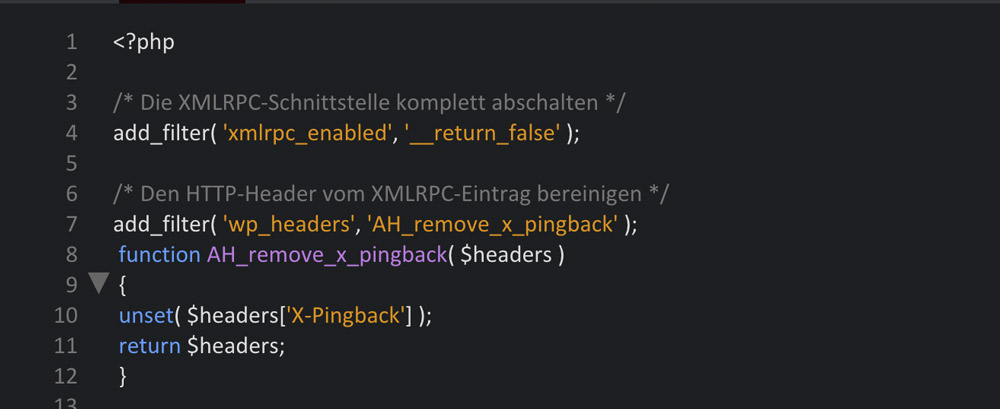
If you are not using XML-RPC capabilities, you should disable it.
WordPress includes the xmlrpc_enabled filter to disable authenticated XML-RPC operations.
WordPress also advises removing XML-RPC if you don’t need it, and limiting access if you do.
But don’t naively turn off XML-RPC.
Some respectable services could need it. For example, mobile apps for WordPress and some remote publishing integrations may rely on the XML-RPC feature.
Use strong administrative passwords
A strong, unique password makes it more difficult for guessed or repeated credentials to work.
NIST suggests techniques that make it harder for online guessing attacks to be successful, including rate limitation.
Enable two-factor authentication
Two-factor authentication is an additional security measure on top of the password.
Another authentication factor can stop easy access to the account, even if an attacker gets a password.
Use rate limiting
Rate limiting may slow down automated efforts to authenticate.
This is very important if you need to keep XML-RPC open for genuine apps.
Keep WordPress updated
Update WordPress, plugins and themes regularly.
Google recommends keeping website software up to date , as attackers can take advantage of security vulnerabilities in obsolete software.
Use a Web Application Firewall
A WAF can assist detect and block malicious requests before they get to WordPress.
It can be particularly handy if you have a site with a lot of automatic traffic.
Should You Disable XML-RPC?
If you do not need XML-RPC , removing it reduces the attack surface available to hackers .
First, determine if you require the WordPress XML-RPC capability in your WordPress security plan.
If your site has XML-RPC enabled, you might want to restrict access to it instead of blocking it.
WordPress points that the xmlrpc_enabled filter only applies to XML-RPC methods that require authentication, not all functions that relate to XML-RPC, such as pingbacks.
Therefore, administrators need to know what their setup is actually obstructing.
What Should I Do After Finding A Failed Attempt?
If you see an XML-RPC login attempt, go back to the basics.
Determine if the attempt was successful. Check your administrator accounts. Change passwords if there’s any reason to suspect credentials may have been compromised. Turn on MFA, analyse security logs, and look for odd administrator activity.
You should also be looking for a bigger trend of failed login attempts.
Google suggests keeping website software up to date and monitoring sites for abuse.
If the XML-RPC login attempt was an isolated attempt, and it failed, then you may not need to take dramatic action. If you have hundreds or thousands of tries, consider the activity a potential automated attack and increase your controls.
Conclusion
A failed XML-RPC login call on your WordPress site can be alarming but one failed request does not guarantee your site has been hacked. The main thing is to research the activity, check authentication logs, look for odd IP addresses and look for repeated requests or successful logins.
If you don’t need XML-RPC, removing or restricting it can lower the attack surface of your website. Use strong passwords, multi-factor authentication, rate limitation, security monitoring and a Web Application Firewall if you require it for valid integrations. Keeping WordPress, plugins and themes up to date also helps protect your website from known security vulnerabilities.
Frequently Asked Questions
1. What is a failed XML-RPC login attempt?
Failed XML-RPC login attempt: An authentication request that was denied. That doesn’t always mean that your WordPress site has been hacked. Look at the IP address, frequency, username, timestamps, any successful authentication occurrences.
2. Is it possible to use xml-rpc for brute force attacks?
Yep. Attackers can misuse the WordPress XML-RPC capabilities to automate password-guessing assaults. WordPress is aware that xmlrpc.php is often the subject of brute-force attacks, especially when certain XML-RPC techniques are exploited.
3. Should I turn off XML-RPC?
Disabling XML-RPC can help limit the attack surface if your website doesn’t use it. If you use services that rely on XML-RPC, consider limiting or rate limiting it instead. Check your site’s integrations before removing the functionality.
4. How can I stop XML-RPC brute force attacks?
You may combine strong passwords, MFA, rate limiting, WAF protection, security monitoring, and appropriate XML-RPC constraints. Rate restriction is also recommended by NIST as a defence against online authentication guessing attacks.
5. Is my WordPress site hacked if I have an unsuccessful login attempt?
No. What does an unsuccessful XML-RPC login attempt mean? The authentication attempt failed. Repeated failures or a successful login that is out of the ordinary, however, should be scrutinised since they could be indicative of password guessing, credential stuffing or account breach.
Test Out Our Tools
If you are looking to improve your cybersecurity knowledge and learn about common security concepts, check out the Try our tools area at ExplainMeTech Tools. The collection gives real technology and cybersecurity tools that can help students, developers, IT pros, and security learners better comprehend routine security jobs.
References
- WordPress – Brute Force Attacks & XML-RPC Considerations
WordPress Developer Resources – Brute Force Attacks - OWASP – Logging Cheat Sheet
OWASP Logging Cheat Sheet - OWASP – Authentication Cheat Sheet
OWASP Authentication Cheat Sheet - Microsoft – Password Spray Investigation
Microsoft Password Spray Investigation - Microsoft – Password Spray Attack Guidance
Microsoft Password Spray Guidance
For more helpful technology, cybersecurity, and digital-security tips, visit ExplainMeTech.com and explore our latest guides, tools, and insights.