
A single wrong header can expose your users’ private info to a random stranger. That is the true hazard of a CORS Misconfiguration. Nothing is broken, no alarm is sounded, and the application continues to perform just as it did before. Meanwhile every website a logged-in person visits can silently view their account credentials, API keys or messages. In this post you will learn what is cross origin resource sharing, why browsers need it, how attackers misuse it, how to test it with burp suite and how to lock it down properly.
What Is CORS And Why Do Browsers Use It?
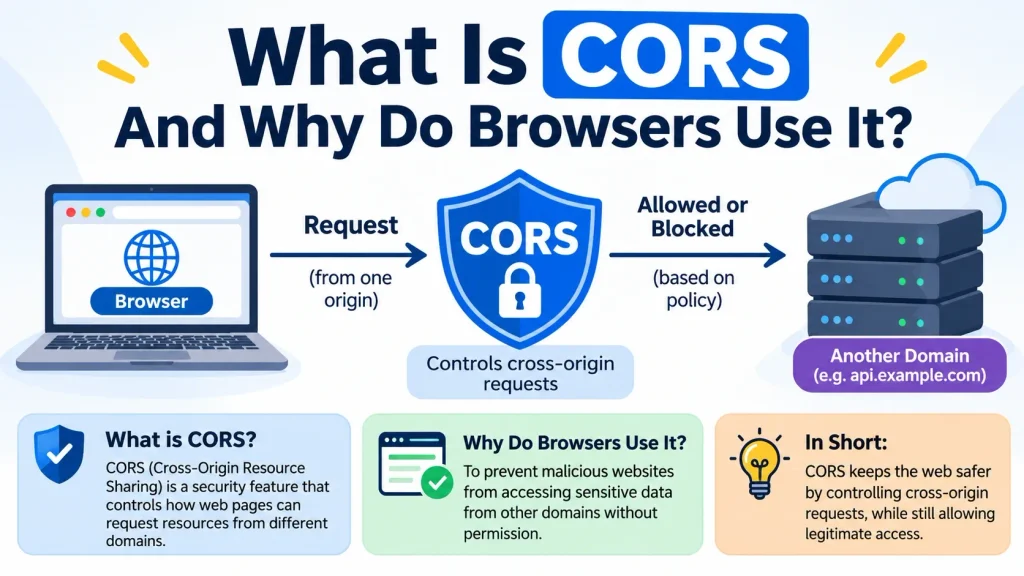
Cross-Origin Resource Sharing, or CORS, is a browser technology that enables a server to indicate which other sites are allowed to receive its answers. Modern apps rarely live on a single domain. The React front end lives at app.example.com and talks to an API at api.example.com; a payment widget loads from a third party; and analytics scripts call home from everywhere. CORS was the tool browsers needed to allow some of the traffic in a secure fashion, without opening up everything.
The server replies with specific headers and the browser evaluates whether the calling page is permitted to access the result. One thing that’s easy to miss is that CORS is not a firewall. It never prevents a request from being sent. If the reply can be read by Javascript from another site, then it controls. That distinction will matter a lot when we get to the attacks.
CORS Misconfiguration: Understanding The Same-Origin Policy (SOP)
To get CORS you need the Same-Origin Policy first. An origin is defined by the scheme, host and port, so https://example.com and http://example.com are different origins, as are https://example.com and https://example.com:8443. Under SOP, a script from one origin can’t read data from another. If that rule wasn’t there, any page you open could secretly grab your email from another tab where you were logged in. The SOP is stringent, which is good for safety but not so much for real-world applications. CORS is a regulated relaxation of that rule. And every CORS Misconfiguration is, at its heart, an error in how that relaxation was given.
How The Access-Control-Allow-Origin Header Works?
When a page of one origin uses an API of another origin, the browser adds an Origin header to the request. The server responds with Access-Control-Allow-Origin, telling which origin it trusts. If the value matches the caller, the browser allows the script to access the answer. If it does not, the output is concealed from the script. Of interest are two linked articles. The Access-Control-Allow-Credentials: true header instructs the browser that it can send cookies and disclose answers that require authentication. Preflight requests are made with the OPTIONS method to get permission before making risky calls such as PUT, DELETE or anything with special headers.
You can watch this interaction from a terminal. The first command gets response headers of a site, and the second fakes the request came from another origin:
bash
curl -I https://example.com
curl -H “Origin: https://attacker.example” \
-I https://example.com
If the second answer is the same as https://attacker.example in Access-Control-Allow-Origin, that server trusts an origin it should not trust and you have just found a CORS Misconfiguration in under a minute. Only execute this against systems you own or have written permission to test against.
What Happens When A Server Allows Any Origin (*)?
If you set Access-Control-Allow-Origin: * , then all sites can read the answer. That’s good for truly public material, like an open dataset or a typeface file that’s free for everybody to use. Browsers also refuse to mix the wildcard with credentials, thus they will not send cookies along with those requests. The trouble comes when developers stumble across that limitation and “solve” it the easy way: the server reads the inbound Origin header and just forwards it in the response, next to Access-Control-Allow-Credentials: true.
That circumvents the browser’s protection and acts as a wildcard with cookies attached. This reflected-origin pattern is the most prevalent CORS Misconfiguration identified in the wild, turning a seemingly harmless convenience into a data leak.
CORS Misconfiguration: How Attackers Exploit Poorly Configured CORS Policies?

Exploiting is shockingly easy. An API may expose account information at /api/profile and respond with any origin and credentials enabled. The attacker hosts a page with a few lines of javascript which queries that endpoint with credentials provided and then sends whatever comes back to a server they control. They get the victim to click a phishing link to the page. The victim is already logged in , so the browser sends along the victim ‘s session cookie . The vulnerable server trusts the origin of the attacker , and the stolen data comes in seconds . No virus, no password breaking needed.
There are a few popular versions that attackers use. The first is the aforementioned reflection of origin. Second is the null origin; some servers trust “null” for local testing, and attackers can create this origin from a sandboxed iframe. The third is poor validation, for example merely ensuring that the origin terminates with or contains a trustworthy domain, which allows lookalikes such as example.com.attacker.example to pass through. The fourth is trusting all subdomains, thus a single XSS problem on a forgotten subdomain becomes a path into the main API. Each of them is a CORS Misconfiguration in a slightly different disguise and the impact ranges from exposed personal info to full account takeover
CORS Misconfiguration: Testing CORS Using Burp Suite
Testing with Burp Suite is easy, as long as you have permission to test the target. Surf the application first through Burp’s proxy so that the authenticated requests are in the HTTP history. Choose an interesting API request, for instance one that yields user data, and send it to Repeater. Change the Origin header to https://attacker.example and send it . Then check the response for Access-Control-Allow-Origin and Access-Control-Allow-Credentials.
Then again, with variations: Origin: null, trusted domain with extra characters appended at the end. Trusted domain used as a subdomain of another site. If the server shows any of these and credentials are allowed, you have a finding to report. Burp’s scanner will also automatically pick up CORS errors, but doing it manually will catch the occasional regex mistake that the automated misses. Write down the actual request, the response headers and the readable sensitive data because that is what turns a vague warning into a fixable report. Regularly performed, this sort of check will reveal a CORS Misconfiguration far ahead of an attacker.
Real-World CORS Misconfiguration Examples
Whistle (CVE-2024-55500)
Whistle is a commonly utilised HTTP debugging proxy. In 2024, SonarSource researcher Paul Gerste noticed that its web interface mirrored the request’s Origin header into Access-Control-Allow-Origin and set credentials to true on its API endpoints. Any website might then send authenticated requests to the developer’s local Whistle instance. Associated with Whistle’s scripting capability that provided a method for attackers to execute commands on the victim’s PC. The first patch decreased the reflection but did not totally bridge the gap. This is a good lesson that just addressing CORS is not always enough.
Tamagui.dev
GitHub Security Lab pointed up an example from the Tamagui website, where the origin check was performed by comparing it to its authorised domains with endsWith. The check can be evaded since an attacker can register a domain that has the trusted string at the end. The write up also says that, depending on the victim’s rights, an attacker may impersonate the victim and potentially purchase things using a stored card. The problem was reported and fixed. Both cases indicate that this sort of defect is not just limited to negligent ones, but also appears in popular programs. In each case, the CORS Misconfiguration was the result of a little coding shortcut, but the results were dire.
How Developers Can Secure CORS Configurations?

Fixing this is primarily a matter of discipline. Use an explicit allowlist of exact origins and compare as entire strings, never using startsWith, endsWith or loose regexes. Do not naively reflect the Origin header. Don’t trust null. Avoid wildcards on anything that returns private or user-specific data. Only allow Access-Control-Allow-Credentials where it is really needed. Limit the allowed methods and headers to those that are really used by the app. Send a Vary: Origin header to stop caches serving the response for one origin to another.
maintain the list of trusted subdomains minimal, and maintain those subdomains patched. One weak subdomain weakens all subdomains. Remember that CORS is not a substitute for authentication, CSRF protection, or appropriate authorisation on the server. It is just one of several layers. Finally, add CORS checks to code review and automated tests so a subsequent modification can’t quietly reopen the problem. Teams that regard every CORS Misconfiguration as a release blocker seldom have one make it to production.
Final Thoughts
Browsers are rigorous by default for excellent reasons and CORS exists to deliberately loosen that strictness. The problems come when convenience triumphs over caution. A wildcard here , a mirrored header there , and suddenly your API is usable from any website on the internet . Treat every CORS Misconfiguration as a data-exposure bug, test for it like an attacker would, and keep your allowlist boring, short and exact. That single practice prevents a broad class of cross-site information leaks.
Frequently Asked Questions
1. What is CORS misconfiguration?
A CORS Misconfiguration arises when a server convinces browsers to trust origins that it should not. This is accomplished via reflecting the Origin header, trusting null, or weak domain matching. This allows untrusted sites to view responses that are meant to be private.
3. Is Access-Control-Allow-Origin: * always dangerous?
No. It’s OK for public, non-sensitive resources. The main danger appears to be a server that masquerades as a wildcard by reflecting origins and accepting credentials (browsers won’t transmit cookies with a wildcard answer).
3. Can a CORS Misconfiguration take my session cookie?
Not exactly. The attacker’s script can’t read your cookie . It can, however, send a request with your cookie attached, and read the response . This is enough to steal profile data, tokens or API keys shown on the page.
4. How to Test for CORS Misconfiguration?
Use curl or Burp Suite Repeater to send requests with a false Origin header. Then check Access-Control-Allow-Origin and Access-Control-Allow-Credentials. Try assault .for example, null and lookalike domains. Test only systems you are authorised to test.
5. How to Fix a CORS Misconfiguration?
Use an exact allowlist instead of wildcard or mirrored origins, deny null, eliminate regex shortcuts, turn on credentials only when needed, add Vary: Origin, and preserve authentication and CSRF protection on the server.
Try Our Tools
Or would you rather see your own headers than guess? Come to the tools area of ExplainMeTech and try our security utilities free of charge. They are designed to help you analyse your site’s behaviour, catch weak settings early, and learn on the move, so a CORS Misconfiguration never goes unreported in your stack. Check out these tools: https://explainmetech.com/tools/.
References And Sources
- OWASP Web Security Testing Guide, “Testing Cross Origin Resource Sharing”: https://owasp.org/www-project-web-security-testing-guide/latest/4-Web_Application_Security_Testing/11-Client-side_Testing/07-Testing_Cross_Origin_Resource_Sharing
- NIST SP 800-53 Rev. 5, “Security and Privacy Controls for Information Systems and Organizations”: https://csrc.nist.gov/pubs/sp/800/53/r5/upd1/final
- Microsoft Learn, “Enable Cross-Origin Requests (CORS) in ASP.NET Core”: https://learn.microsoft.com/en-us/aspnet/core/security/cors
- Google web.dev, “Cross-Origin Resource Sharing”: https://web.dev/articles/cross-origin-resource-sharing
- PortSwigger Web Security Academy, “Cross-origin resource sharing (CORS)”: https://portswigger.net/web-security/cors
If you want more technology, cybersecurity and digital-security ideas, head on over to ExplainMeTech.com and see our latest guides, tools and insights.