
Passwords are the foundation of everyday digital security. We use them to log into our email accounts, social media profiles, online banking, shopping websites, cloud storage, work platforms, and many more services. There is a lot of personal and financial information kept online, therefore it’s crucial to protect these accounts using strong credentials.
A strong password is one that is hard for hackers to guess or breach. It should be long, original and unpredictable, rather than easily available personal information. Strong passwords, as well as security methods such as multifactor authentication and password managers, can go a long way to protecting online accounts.
What Is A Strong Password?
Strong password A login credential that is meant to resist guessing, automated attacks and other typical tactics used to gain unauthorized access to accounts.
Weak passwords are often constructed using predictable patterns. For instance, many people choose a family member’s name, a birthday, a telephone number, their pet’s name or something similar that is easy to remember. Weak passwords are not difficult to guess.
A strong password should rather be long enough, and hard to associate with the account’s owner. It should also be different from passwords you use for your other accounts.
A person’s name with a birth year is an example that generates a predictable pattern. A random password or an unpredictable collection of words is a much stronger choice.
The thing is not just to make a password complex. The aim is to make it hard for another person or automated system to guess.
Why Are Strong Passwords Important?
One of the most fundamental ways consumers may safeguard their digital identities is to use strong passwords. A failed password can mean that an attacker has direct access to an account and what is saved in it.
Protect Personal Information
Online accounts can hold personal information including private conversations, photos, documents, contact lists and other valuable data. A strong password helps to prevent others from illegally accessing this information
Protect Financial Accounts
Banking, payment and retail accounts may contain useful financial information. It is especially vital to protect these accounts with strong and unique credentials.
Reduce Account Takeover Risks
When an unauthorized container takes over an account. If an attacker has passwords, they can attempt to manipulate account settings, replace renewal data, or lock a legitimate user out of an account.
Minimize the impact of a data breach
Websites and online offerings are vulnerable to security breaches. If a password is stolen in a breach and that password is used elsewhere, attackers can try to use that information on other sites as well.
This is called credential stuffing. Employing several passwords for different accounts can reduce the risk of damage from a compromised password.
Protect Email Accounts
Email accounts are especially important since they are often linked to other internet services. We usually send password reset links and security notices to email addresses.
If an attacker acquires access to your email account, they might try to reset passwords on other services linked to your email address .
What Makes A Password Strong?
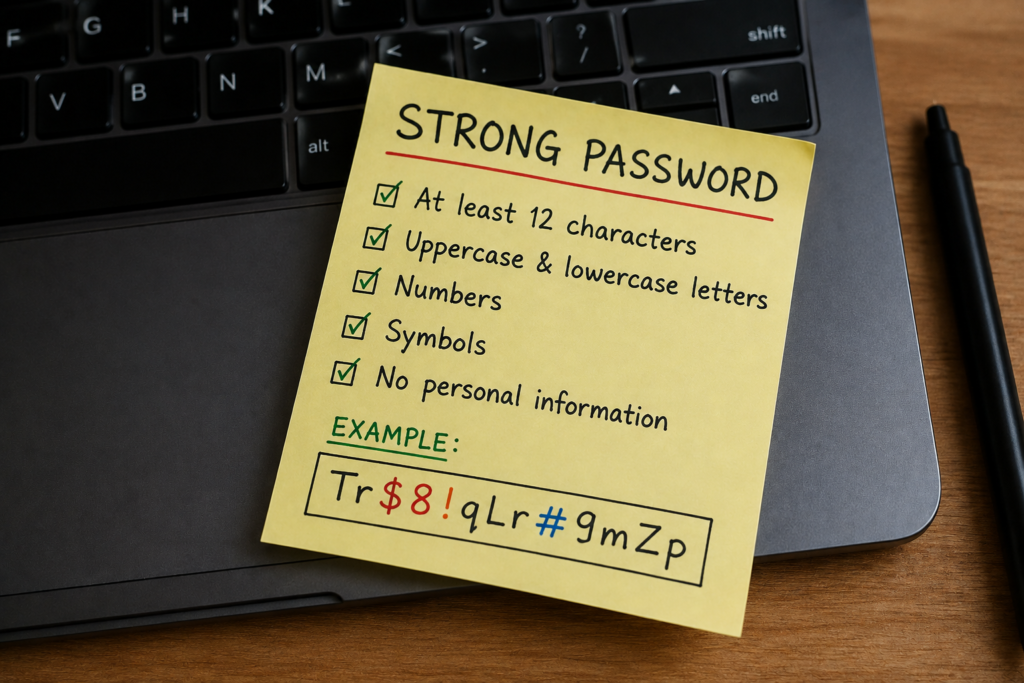
The degree of protection a password gives is dependent on a number of things.
1. Length
One of the most significant aspects of a strong password is length. The longer the password, the more combinations there are, and the more difficult it is to guess automatically.
Instead of making a brief password with all kinds of characters , the emphasis should be on a password that is long enough and unpredictable enough .
2. Unpredictability
A good password will not be obvious in terms of pattern.
Avoid the obvious combos such as:
- Common words
- Sequential numbers
- Keyboard patterns
- Names
- Birthdays
- Familiar phrases
- Repeated characters
- Common substitutions
Just replacing numbers with letters that look like numbers doesn’t necessarily make a password secure. Attackers can automatically consider numerous frequent patterns in passwords.
3. Uniqueness
Each significant account should have a password.
For example, do not use your email password for your social media account or online shopping account, too. In the case of a data breach for one of your services, a unique password means the leaked credential can’t be used to access your other accounts.
4. Avoid Personal Information
Don’t put anything in your passwords that can readily be traced back to you.
Avoid using:
- Your full name
- Date of birth
- Phone number
- Home address
- Pet’s name
- Family members’ names
- Employer’s name
- School name
- Favorite team
- Other publicly available information
Details that are often more easily found by attackers are occasionally published on social media.
5. Use Randomly Generated Passwords When Possible
Random password generators produce credentials that are hard to predict since they do not rely on personal information or any common patterns.
These passwords can be generated and stored in a password manager, which can be quite handy for users so they don’t have to remember each credential.
Create A Strong Password With Our Password Generator
Creating a long, unique and unpredictable password for many internet accounts might be tough. Our Password Generator Tool will make it easy to generate secure passwords without having to think about complicated combinations.
Try Our Password Generator: https://explainmetech.com/tools/password-generator/
How Do Hackers Crack Weak Passwords?
Cybercriminals have a variety of different ways to get passwords. Understanding these strategies helps you see the importance of having strong and unique credentials.
Brute-Force Attacks
A brute-force attack is basically when you try all possible combinations of the password until you find the right one.
Automated systems can more easily test short passwords and predictable combinations. The longer and less predictable the password the harder it is to pull off this type of assault.
Credential Stuffing
Credential stuffing is when attackers use usernames and passwords from a data breach to try to log into other services.
This exploit is particularly effective when people re-use the same password on different sites.
If a shopping website’s password is disclosed and the password is reused on an email account, attackers may try the credentials against the email account.
Unique passwords go a long way to mitigating this danger.
Phishing
Phishing attacks are an effort to deceive people into providing their login details.
The attacker could send an email, SMS message or other message that appears to be from a real organization. The notification may cause the recipient to log in, check information, or handle an urgent security issue.
The link could take the user to a fake website that is meant to steal the user’s account and password.
Phishing is a strong password is not a full guard. Caution should be used while clicking on unknown links or submitting credentials to unknown websites.
Social Engineering
Social engineering is the concept of fooling others into handing out secret information.
Social engineers may impersonate a customer care rep, a coworker, admin or other individuals. Then they can build scenarios that trigger urgency or other emotions to obtain the data they want. Never disclose your password to anyone who asks for it.
How To Create A Strong Password?
It doesn’t have to be hard to create strong passwords, just a little consistency.
Step 1: Make It Long
Generally, the larger the password, the more secure it is because it is harder to guess.
Step 2: Keep it Secret, Keep it Safe
Don’t make a memorable password for your account of any personal information that could be easily discovered by others.
Step 3: Confirm All Your Passwords Are Different
Do not use the same password for several accounts. If you are using the same password, make sure it is in reputable and reliable services such as email, banking, storage or work accounts.
Step 4: Use a Password Manager
A password manager can generate a unique password for each service you use. This also means you don’t need to remember them all, since the password manager will remember and store them securely for you. A password manager can also type your password in for you, automatically, so you don’t have to write it in every time you visit a service.
Step 5: Turn on Multi-Factor Authentication, if available
Multifactor authentication (sometimes known as two-factor authentication) is an added security layer for your accounts.
Usually an extra password, an authentication app or any other trusted technology that confirms you’re truly trying to enter into an account.
Also, MFA is sometimes termed multifactor authentication. This extra layer of security can make your accounts more difficult to crack if your password ends up in the wrong hands.
Why Use A Password Manager?
It’s hard to remember a different, long, random password for every online account. Password managers assist overcome this problem by storing login information securely.
A password manager may usually assist users:
- Generate strong passwords
- Create unique credentials for different accounts
- Store passwords securely
- Autofill login details
- Reduce password reuse
- Manage credentials across supported devices
- Make it easier to update compromised passwords
The main benefit is ease, but it doesn’t compromise the strength of a password. Rather than trying to remember a different memorable password for each website, users can have the password manager generate less predictable credentials and store them securely.
Consumers should pay attention to the provider’s security practices, encryption, authentication methods and reputation when selecting a password manager.
Are Passwords Becoming Obsolete?
Passwords are still a vital tool in online security, but authentication technology is improving.
The goal of passkeys and other newer technologies is to eliminate reliance on traditional passwords. Passkeys can employ cryptographic technology, and can use device-based authentication such as a fingerprint, face recognition or device PIN.
But passwords are still very much in use on websites, applications, enterprise systems and other digital services. Most users will still have to deal with password authentication for many years to come.
So, understanding how to develop and manage strong passwords is still a crucial cybersecurity skill.
But even with the availability of modern authentication methods, users should also continue to practise good security habits and enable additional security measures that are supplied by their accounts.
Checklist For Strong Passwords
Before you use a password, please examine the following checklist:
Is the password sufficiently long?
Is it difficult for someone else to predict?
Does it avoid personal information?
Is it unique to this account?
Does it avoid obvious patterns?
Is it stored securely?
Are important accounts protected with multifactor authentication?
Are you entering the password only on legitimate websites?
Have you avoided sharing the password with anyone?
If you answered yes to these questions, you’re on the right path to improving the security of your accounts.
Realistic Examples
Using the Same Password
Say Anita has the same password for her email, shopping account and social media presence. One day, the shopping website has a data breach and her login details are disclosed. The attacker may try the same username/password combination on other sites. If the credentials do work for her email, the attacker may be able to utilise that account to obtain password-reset links for other services.
Lesson: Don’t reuse passwords on different critical accounts.
The use of personal information
For example, Rahul may make a password like RahulCricket1998, including his name, his favourite cricket team and his birth year. It does have letters and numbers, but much of the information could be dug up through social media or other public sources. Someone trying to guess his password could use these details as clues.
Lesson: Don’t include your name, birth date, hobbies, sports teams or other personal facts while generating passwords. A randomly generated password is a more secure alternative.
Conclusion
Having a strong password is essential to protecting your online identity and private information. The solution is not as simple as creating an elegant mix of characters. One must have long, unique, and non-guessable passwords. In addition, Account Lockout policies can provide an extra layer of security by temporarily blocking access after multiple failed login attempts, helping prevent attackers from repeatedly guessing passwords.
Strong and unique passwords are essential in keeping online accounts and personal information secure, but there are other measures that one can take to further protect one’s online identity and information.
Frequently Asked Questions
1. What is considered a strong password?
Pick a password that is lengthy, distinctive and hard to figure out. Avoid common words, personal information, or recognisable sequences and phrases that you might have used to secure other accounts.
2. Is a longer password a stronger password?
Length is crucial, but it’s not the only thing that matters. A long password is weak if it has predictable information in it. In a perfect world, passwords are long and surprising.
3. Should I use different passwords for different accounts?
Yes. Unique passwords are important to prevent one hacked account from putting your other accounts at danger. A password organiser can help you manage many unique passwords.
4. How secure are password generators?
Use a good password generator to create random and difficult-to-guess passwords. Ensure that the one you choose is from a reliable source, and be aware of how it handles the passwords it creates.
5. Is a strong password necessary to safeguard an account?
A strong password is a crucial security strategy, but it shouldn’t be your entire defence. If the provider offers it, turn on two-factor or multi-factor authentication and watch for signs of phishing and other unusual login behaviour.
For more helpful technology, cybersecurity, and digital security tips, visit ExplainMeTech.com and explore our latest guides, tips, and insights.