
Every modern app talks to something else: a database, a payment gateway, a cloud storage bucket, an email service. Each of those discussions requires confirmation of identification, and that proof is hidden. Secrets Management is the art of keeping those secrets away from the wrong people, while giving them to the right workloads at the right time. Do it wrong and a single leaked key can give an adversary your entire environment.
In this guide, you’ll learn what application secrets are, why hardcoded credentials lead to genuine breaches, how environment variables compare to secret vaults, how HashiCorp Vault is developed, and how rotation and access control maintain Secrets Management healthy in the long run.
What Are Application Secrets?

Application secrets are the sensitive information that allows access to a system or secure information. API keys, database passwords, OAuth client secrets, access and refresh tokens, TLS private keys, SSH keys, and encryption keys are the obvious suspects. Here’s a simple test: if the value might be used by someone outside your team to impersonate your service or read confidential data, it’s a secret.
Most teams have much more secrets than they realise. They hide in source repositories, CI/CD variables, container images, configuration files, old tickets and chat messages . Good Secrets Management consequently starts with an honest inventory, because you can’t protect a credential you don’t know about.
Risks Of Hardcoded Credentials
Hardcoding is when you type a password or key directly into a source code or a configuration file that is committed. It feels like it’s convenient day one and harmful for ever after. Git history is immutable, thus if you deleted a key in a later commit, it still survives in the older ones. Bots check public repositories within minutes of a push. Private repositories also leak, via stolen laptops, over-shared access and forks. This flaw is prevalent enough to have its own article, CWE-798, “Use of Hard-coded Credentials”, which is a textbook example of bad Secrets Management.
Damage rarely affects only one system. Attackers can use an exposed cloud key to run pricey crypto-mining machines, replicate storage buckets or pivot into neighbouring accounts. Every developer and every environment also has the same hard programmed values so you can’t determine who’s using them, and to change them you have to reinstall everything at once. Good Secrets Management teams assume that any credential identified in code is already compromised and revoke it promptly.
Environment Variables Vs Secret Vaults
Environment variables are the first step away from hard coding. The application reads values at run time so the code remains clean and each environment can have distinct settings. They’re free, supported everywhere and meet the twelve-factor app methodology. But the limits are readily seen. They are readable by anybody with access to the process, they often appear in crash dumps and debug logs, child processes inherit them, CI platforms save them as plain settings, and there is no audit trail, versioning or built-in rotation.
A secret vault is a dedicated service that encrypts secrets at rest, authenticates every caller, authorises access by policy, logs each request and supports leasing and rotation. Popular choices include HashiCorp Vault, AWS Secrets Manager, Azure Key Vault and Google Secret Manager. For a hobby project, environment variables are often okay. For Secrets Management, a vault is the most robust base, particularly for production systems, regulated data, or multiple microservices. A common middle ground is to employ the vault as the source of truth and only inject values into memory-backed files or into environment variables during startup, and many teams embrace that hybrid as their Secrets Management standard.
| Feature | Environment variables | Secret vault |
| Cost and setup | Free, instant | Service to run or subscribe to |
| Encryption at rest | No | Yes |
| Audit logging | No | Yes, per request |
| Fine-grained access | No | Yes, policy-based |
| Automatic rotation | No | Yes |
| Best for | Local dev, small apps | Production, teams, compliance |
HashiCorp Vault Architecture
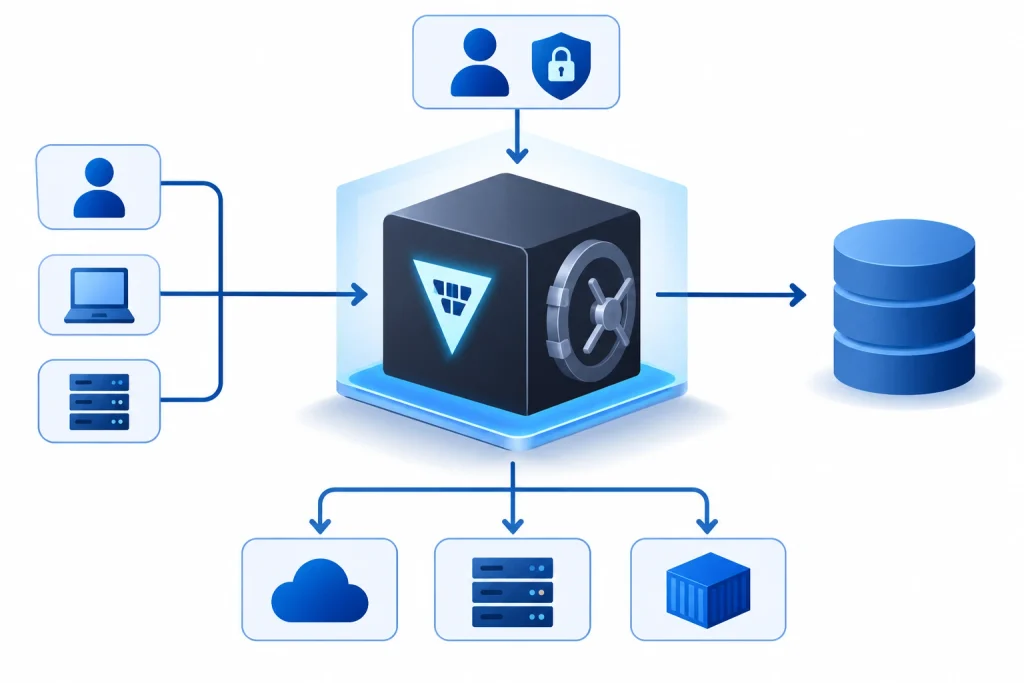
Vault is one of the most popular open reference designs for credential protection. It is important to understand how it all fits in. All is available through one API . Several collaborating components do the work .
Storage backend: The storage backend is where the persisted data is stored. For example integrated Raft storage or Consul. Vault doesn’t trust it: data is encrypted before it’s written. The barrier is the encryption barricade around that data. By default, Vault is sealed and can only be decrypted after being unsealed using key shares produced using Shamir’s secret sharing or auto-unseal using a cloud key provider.
Secrets engines: Secrets engines either store or generate secrets. The key-value engine stores static values, whereas the database, AWS, and PKI engines create dynamic secrets. An example would be a database user valid for one hour and immediately cancelled when the lease expires. Auth methods authenticate who is calling, human or machine, with tokens, AppRole, Kubernetes service accounts, OIDC, LDAP or cloud IAM identities.
Policies: Policies are path-based rules and have a deny-by-default model, which means a task only sees the routes that were expressly supplied to it. Audit devices log all requests and responses, and hash sensitive information. Vault is run as a cluster with one active node and many standbys for availability. Storage, Identity, Policy and Audit all live together, which is why Vault is a typical anchor for Secrets Management architectures in larger organisations.
Secret Rotation And Access Control
Rotation is the process of replacing a credential on a schedule or after an event. It reduces the time during which a stolen secret is useful. Rotate when an employee leaves, when you suspect exposure, and on a regular cycle (e.g., every 30 to 90 days for static credentials and every few minutes or hours for dynamic ones). NIST SP 800-57 describes this concept as cryptoperiods, which are time limits placed on the duration of service of a key. So automate the manual rotation (you skip it), develop programs that reload secrets without a restart, and allow two valid versions during the changeover. Effective Secrets Management makes rotation boring. The idea is to be boring.
Access control determines who can get what. Apply least privilege: Each service should have its own identity, only the pathways it needs, short-lived tokens, and separate dev, staging, and production environments. Require multi-factor authentication for humans Document a break-glass protocol for emergencies Review permissions quarterly Feed audit logs into your SIEM and alert on anomalous reads . Add secret scanning via pre-commit hooks and tools like Gitleaks or TruffleHog to catch problems before they ship. Mature Secrets Management programs additionally track metrics: how many long-lived keys remain, how fast can a leaked key be revoked, and what share of secrets dwell in the vault.
Secrets Management Best Practices Checklist

If you need a rapid action plan, begin with these steps. Record all secrets and their owners . Remove credentials from code and history . Store them in a vault, or at least your cloud provider’s secrets service. Assign a unique identity and least privilege permissions to each workload. “Use short-lived dynamic credentials, automate rotation, and enable audit logging with alerts. And last, execute secret scanning on every commit and in CI. Doing this in order delivers the biggest security wins first and gives Secrets Management a realistic path to maturity rather than a dangerous all-in rewrite.
Two Real World Examples
The 2016 Uber breach
Engineers put AWS access credentials in a private GitHub repo and attackers spotted them. They used those keys to access an Amazon S3 bucket containing personal data on about 57 million riders and drivers. Uber paid the assailants $100,000 and hid the incident for about a year, eventually resulting in regulatory action and a criminal conviction of its former security chief for obstruction. The lesson: credentials in code, even in a private repo, are a standing invitation, and appropriate Secrets Management would have kept the keys out of the repo altogether.
The 2023 CircleCI incident
CircleCI revealed in January 2023 that it discovered an employee laptop had been infected with malware that captured a valid session token allowing attackers access to internal systems and client data. Customers were asked to rotate every secret that the platform stored, including environment variables, tokens and keys. The lesson: long-lived secrets stored as plain CI variables increase the blast radius, whereas organisations with short-lived credentials and automated rotation were considerably quicker to recover.
Final Thoughts
Secrets are the keys to your digital house . Breaches start when you treat them like ordinary configuration . First, discover all credentials, get rid of any hardcoded information, move critical values into a vault, grant short-lived access, and rotate on a timetable. These behaviours are easy, repeatable, and make Secrets Management a quiet, predictable part of your engineering routine, instead of a scramble after an incident.
Frequently Asked Questions
1. What is Secrets Management?
Secrets Management is a collection of tools and practices used to store, distribute, rotate and audit sensitive credentials such as API keys, passwords, certificates and tokens. You don’t throw them into code or chat , you keep them in a protected system and only read them by permitted identities and log every access .
2. Is storing API keys in env variables safe?
They’re better than hard-coding, but they aren’t foolproof. Variables are leaked through logs, crash reports, process inspection and CI settings and have no auditing or rotation. They are fine for local development and small projects, but for production workloads, secrets should be fetched from a vault at runtime. Done right, the strategy adds robustness to Secrets Management without complicating deployment.
3. How often do I need to rotate API keys and passwords?
There is not one number. A typical baseline is every 30 to 90 days for static credentials, immediately following suspected exposure or staff changes, and much more frequently, even hourly, for dynamic secrets. Follow your compliance standards and automate the process so it actually happens.
4. Is HashiCorp Vault gratis?
Vault also has a community edition that you may self-host, and its premium Enterprise and managed HCP versions that include features like replication and support. Compare it with cloud-native choices like AWS Secrets Manager , Azure Key Vault and Google Secret Manager . Licensing terms for community edition has changed over the years, so read current terms before adopting it.
5. What happens if a secret leaks to GitHub?
Just deleting the commit is not enough; you need to revoke or rotate the credential first. Then examine provider logs for unusual use, clear repository history if needed, alert affected teams and implement secret scanning to catch the same mistake earlier. Think of the situation as a learning opportunity for better Secrets Management, not a one-off cleanup.
Try Our Tools
Ready to start applying these ideas? Explore ExplainMeTech’s free utilities and boost your daily security and developer chores, from one-off checks to everyday aids to enhance Secrets Management routines. Check out the complete collection here: https://explainmetech.com/tools/.
References
- OWASP, Secrets Management Cheat Sheet: https://cheatsheetseries.owasp.org/cheatsheets/Secrets_Management_Cheat_Sheet.html
- NIST, SP 800-57 Part 1 Rev. 5, Recommendation for Key Management: https://csrc.nist.gov/pubs/sp/800/57/pt1/r5/final
- Microsoft Learn, Azure Key Vault best practices: https://learn.microsoft.com/en-us/azure/key-vault/general/best-practices
- Google Cloud, Secret Manager best practices: https://cloud.google.com/secret-manager/docs/best-practices
- HashiCorp, Vault architecture and internals: https://developer.hashicorp.com/vault/docs/internals/architecture
If you want more technology, cybersecurity and digital-security ideas, head on over to ExplainMeTech.com and see our latest guides, tools and insights.