
NAT Explained: How Private IP Addresses Access The Internet is a critical networking topic to grasp for anyone studying networking, cybersecurity, ethical hacking or system administration. Most devices at home and in business use private IP addresses, but the websites and Internet services usually interact using publicly routable numbers. NAT Explained explains how a router or gateway turns private addresses to a public address so devices can communicate outside the local network.
What Is NAT?
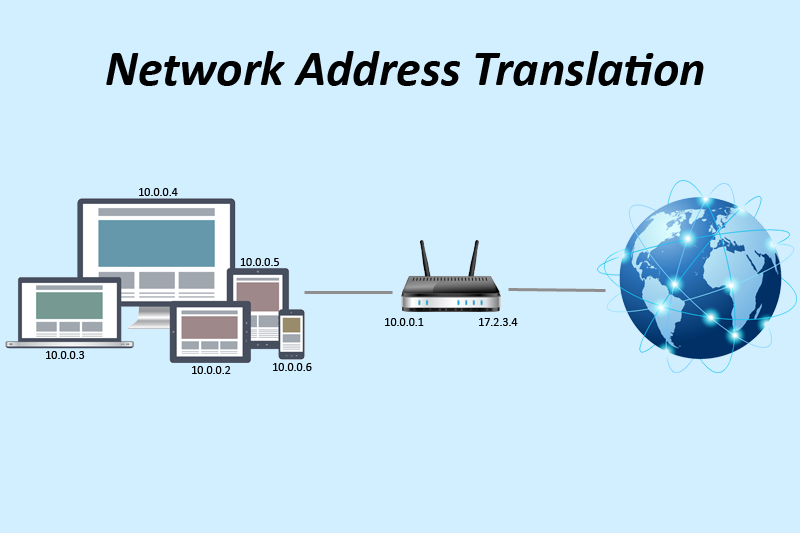
NAT Simplified NAT denotes Network Address Translation. NAT is a networking technology that alters IP address information when packets pass across networks. It is often applied in routers, firewalls and cloud networking gateways.
A typical home network may consist of devices such as laptops, smart phones, smart TVs, printers etc., using private IPv4 addresses. Examples: 192.168.1.10, 192.168.1.20, 192.168.1.30.
These are private addresses, not directly routable on the public Internet. But the router does use nat and does utilise a public ip for internet communications . NIST defines NAT as a method that maps addresses between networks, enabling private networks to interact using globally routable addresses.
Why Do Private IP Addresses Need NAT?
NAT is easier to understand when you examine the limited number of IPv4 addresses. IPv4 has a limited address space and giving a unique public address to every device is inefficient and often unneeded.
Private IP ranges can be reused on different networks. Typical private IPv4 ranges include:
10.0.0.0/8
172.16.0.0/12
192.168.0.0/16
These address ranges are for private networks, not for direct routing on the public Internet. RFC 3022 describes how NAT provides a method for networks employing private addresses to communicate with external networks with globally unique addresses.
This means that hundreds of devices in thousands of houses can use addresses like 192.168.1.10 without those addresses being unique across the world.
How Does NAT Work?
NAT Explained: To better understand the procedure, let’s walk through a basic example.
Let’s say your laptop has the private IP address 192.168.1.10. Your home router has a public IP address, which is provided by your Internet service provider.
When you access a website your laptop makes an outbound connection. The packet starts with the laptop’s private source address and the destination address of the webpage.
Packet received by router, NAT performed. It replaces the private source information with information about its public Internet connectivity.
It also maintains a translation table to identify which internal device initiated the connection. The router looks up the translation information when the Web site sends back its response, and transmits the response to the correct private device.
This enables several devices to share a single public IPv4 address.
NAT And Port Address Translation
NAT Explained: It also has a key technology called Port Address translation or frequently dubbed PAT or NAPT.
PAT allows numerous private devices to share a single public IP address, but each with a separate source port. For example,
| Device | Private IP | Private Port | Public IP | Public Port |
| Laptop | 192.168.1.10 | 50001 | Public IP | 61001 |
| Phone | 192.168.1.11 | 50002 | Public IP | 61002 |
| TV | 192.168.1.12 | 50003 | Public IP | 61003 |
The router keeps track of these mappings and utilises them to determine the correct internal device.
RFC 3022 defines NAPT as “the translation of multiple private network addresses and their TCP/UDP ports to a single globally unique address and associated ports”.
NAT Vs Private IP Vs Public IP
NAT is commonly confused with private and public IP addresses, but these are different things.
A private IP address is an identifier for a device on a local network. This is not meant to be routed directly on the public Internet.
A public IP address is globally routable and can be used to communicate over the Internet.
NAT is the translation technique that can allow private devices to communicate over a public address.
As an example:
Laptop -> Private IP -> Router/NAT -> Public IP -> Internet
The private address is the address used internally to identify the device and the public address is the address used to identify the network publicly.
What Happens When You Visit A Website?
NAT becomes practical when you look at a normal web request.
A laptop using 192.168.1.10 views a webpage.
The basic sequence, is:
- The laptop creates a connection.
- The packet reaches the router.
- The router identifies the outgoing connection.
- NAT changes the source addressing information.
- The packet travels to the Internet.
- The website responds.
- The response reaches the router’s public interface.
- The router checks its NAT state.
- The router translates the response back toward the private device.
- The laptop receives the response.
This happens fast and is unseen to the user most of the time.
Does NAT Provide Security?

NAT does not suggest that NAT is a complete security solution. NAT can hide the internal addressing from external systems. Many conventional NAT implementations do not allow unsolicited inbound connections by default . This privacy feature is discussed in RFC 3022 .
NAT is not a firewall, however.
A secure network should use security controls such as suitable firewall rules, authentication, encryption, monitoring, segmentation and others. OWASP advocates minimising the number of exposed components and designing security in the architecture rather than through obscurity.
Thus, NAT is a networking function and should not be used as a substitute for cybersecurity safeguards.
Types Of NAT
NAT can have a few distinct setups.
1. Static NAT
Static NAT sets up a relatively static mapping between a private address and a public address. This is useful when you have an internal system that needs a consistent mapping that can be accessed externally.
2. Dynamic NAT
Dynamic NAT maps private addresses to a pool of available public addresses. The specific public address may differ depending on the settings and the connection.
3. PAT/NAPT
PAT allows many private devices to share a smaller number of public addresses by differentiating connections at the transport layer via ports.
4. Destination NAT
Destination NAT modifies the destination address of traffic. It is often used in situations when inbound traffic has to be forwarded to an internal service.
NAT In Cloud Networks
NAT isn’t just for residential routers.
Cloud platforms also offer NAT services. For example, Google Cloud NAT lets resources without external IPv4 addresses access to the Internet using outbound connections through the specified NAT architecture. However, as Google explains, Cloud NAT only enables outgoing connections and established incoming responses—not unsolicited inbound connections.
Microsoft Azure also offers NAT Gateway for explicit outward Internet access from private subnets. Microsoft says Azure will change the default for new virtual networks to private subnets after March 31, 2026. That means for workloads that need Internet access, having specified outbound connection options will be important.
Cloud NAT offers identical core functionality to NAT on traditional networks, but the implementation and setup are different.
NAT And Cybersecurity
NAT is very valuable to students of cybersecurity because it is common to see private and public addresses in network traffic analysis.
Many systems may share a NAT address . Security teams may observe the same public IP for many internal devices . Thus logs with source ports, timestamps, NAT mappings, firewall logs, and other connection information can become crucial in investigating network behaviour.
OWASP’s recommendations on network segmentation is focused on separating network components and regulating the traffic that flows across security zones. NAT can be part of a broader network architecture, but is no substitute for segmentation or restriction of access.
Advantages And Limitations Of NAT
Network address translation (NAT) also means knowing both the benefits and the constraints.
Advantages
- Conserves public IPv4 addresses.
- Allows many devices to share public addresses.
- Makes private network addressing easier to manage.
- Can reduce direct exposure of internal addresses.
- Supports common home and enterprise network architectures.
Limitations
- Can complicate end-to-end connectivity.
- Some applications require additional NAT traversal techniques.
- Troubleshooting can become more complicated.
- NAT does not provide complete security.
- Incoming connections may require additional configuration.
Applications that require direct peer-to-peer connectivity may have problems when many NAT devices are in between the participants.
Why NAT Is Still Important?
NAT is still relevant since IPv4 is still widely employed in household, enterprise, data-center and cloud contexts. IPv6 use is growing, while NAT and private addressing remain common in organizations’ networks.
Knowing how NAT also explains why your laptop can have a private address like 192.168.1.10 while an online service sees traffic from an entirely different public IP address.
NAT brings together a few fundamental networking concepts: private IP addresses, public IP addresses, routing, ports, gateways, and Internet access.
Conclusion
Network Address Translation (NAT) is a fundamental networking technology that enables devices with private IP addresses to connect to the public Internet through a public IP address (or addresses). This is done by translating address information and, in many typical setups, by keeping track of port numbers so that numerous devices can share the same public IPv4 address.
Understanding NAT will help you understand how home routers or workplace networks and cloud settings enable Internet access to inside devices on private networks. Modern cloud services like Azure NAT Gateway and Google Cloud NAT also use NAT to enable controlled outbound connection for resources that don’t need public IP addresses.
Frequently Asked Questions
1. What is NAT in network?
NAT Explained is short for Network Address Translation, a method that alters IP addressing information when traffic travels between networks. It is usually used to permit devices with private IP addresses to access Internet services via a public IP address.
2. Can there be several devices with one public IP address?
Yes. NAT Explained usually involves several devices behind a single public IPv4 address. With Port Address Translation , the router can keep track of the translations it has to do by using source ports to differentiate connections .
3. Is NAT the same thing as a firewall?
NAT Explained does not describe address translation. NAT is not a firewall . A firewall regulates network traffic based on security rules . NAT and firewall functionality can be provided by a router. However, the two functions should not be considered as one and the same.
4. Why do I get a private IP address assigned to my device?
NAT Explained demonstrates the value of private addressing. Private IP addresses enable devices to connect with each other on a local network without requiring each device to have a globally routable IPv4 address.
5. Is my IP address hidden via NAT?
Internet traffic can look like it is coming from the public IP address of the network . NAT Explained can disguise the private IP address of an internal device from normal outside communication . But NAT should not be interpreted as anonymity or full protection of cyber security.
Try Our Tools
NAT is simpler to comprehend when you try networking principles yourself. Take a look at our resources on the Try our tools page. These include useful utilities for cybersecurity and technology, including software built to aid with common security and networking activities.
References
NIST – Network Address Translation (NAT)
NIST: Network Address Translation
RFC 3022 – Traditional IP Network Address Translator
RFC 3022: Traditional NAT
OWASP – Network Segmentation Cheat Sheet
OWASP Network Segmentation Cheat Sheet
Microsoft Learn – Azure NAT Gateway
Microsoft Learn: Azure NAT Gateway
Google Cloud – Cloud NAT
Google Cloud: Cloud NAT
For more helpful technology, cybersecurity, and digital-security tips, visit ExplainMeTech.com and explore our latest guides, tools, and insights.